
Troubleshooting Billing Restrictions
Billing status is managed at the account level. When an account has a payment issue or reaches a seat limit, Timequip may restrict actions that create new work or add more users.
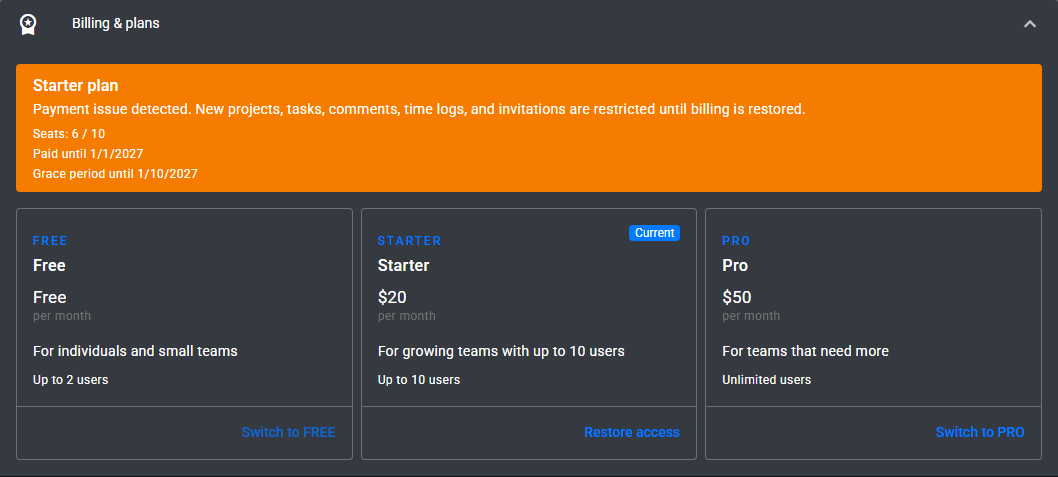
Common restricted actions
- Creating new projects.
- Creating new tasks.
- Adding task comments.
- Creating time logs.
- Inviting new account members.
If the account is past due
- Open Account Settings.
- Review the billing banner and current plan details.
- Ask the account Owner to restore billing or switch to an active plan.
- Retry the restricted action after billing is restored.
If the seat limit is reached
- Open Account Settings.
- Review current seat usage. Pending invitations count toward the limit.
- Remove unused members or pending invitations, or upgrade to a plan with more seats.
- Invite the user again after seat usage is below the plan limit.
Who can fix billing?
Only the account Owner can start checkout or change the subscription. Admins and Members can see billing status when it affects their work, but they cannot manage the plan.