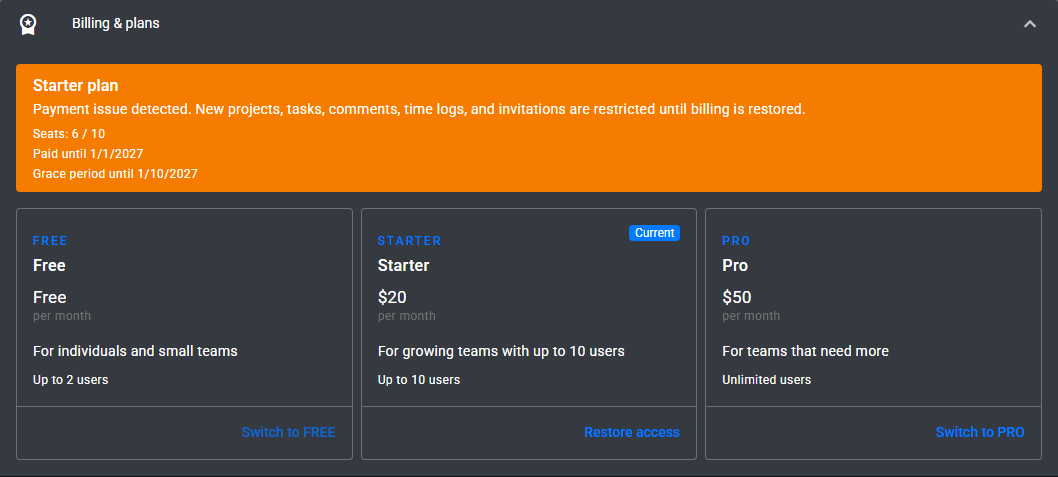
Billing in Timequip is managed at the Account level. This means your subscription, payment status, renewal settings, and user limits apply to the whole account, not to individual projects or team members. If your company uses multiple accounts, each account has its own billing status and subscription settings.
Only the Account Owner can manage billing. Owners can review the current plan, start an upgrade, restore a subscription after a failed payment, and monitor account usage. Other users may still see the current billing status, but they cannot change the subscription or start checkout.
You can open billing details from Account Settings. There you will see your current plan, subscription status, seat usage, renewal state, and important dates such as the end of the paid period or the grace period. This page is also where you can switch to another plan when your team grows or when you need to restore access after a payment issue.
Timequip uses seat limits to control how many people can belong to an account under a given plan. Seat usage includes both active members and pending invitations. This helps prevent accounts from exceeding the paid limit through invites that have not yet been accepted. If your account reaches its limit, you will need to remove unused members or invitations, or move to a higher plan before adding more people.
If a payment cannot be processed, the account may enter a Past Due state. In this state, existing data remains available, but some actions are restricted until billing is restored. For example, your team may be prevented from inviting new members or creating new items that would increase account usage. Timequip will also send billing reminders so the account owner has time to resolve the issue.
If the payment issue is not resolved before the grace period ends, the account may become Blocked. When an account is blocked, access to projects, tasks, and team management is restricted until payment is restored. This helps protect subscription integrity while still allowing the owner to open billing settings and recover the account.
If you are planning to change to a lower plan, review your current seat usage first. If your account currently has more members or invitations than the lower plan allows, you may need to reduce usage before the change can fully take effect. This is especially important for growing teams that occasionally add temporary collaborators.
To keep billing running smoothly, it is a good idea to:
- Review seat usage regularly
- Remove expired or unnecessary invitations
- Make sure the account owner’s billing email is current
- Resolve payment reminders as soon as they appear
- Check the pricing page before upgrading or switching plans
In short, Timequip billing is designed to be simple: one subscription per account, clear visibility into usage, reminders before access is affected, and straightforward recovery when payment needs attention. By checking billing settings regularly, account owners can keep their teams active without interruption.